
Arduino RFID Attendance System
₨2,590.00
Delivered All over Pakistan 🇵🇰
The Arduino RFID Attendance System is an unassembled project that uses RFID technology, an Arduino controller, and an LCD display to automate attendance tracking. It provides quick card-based identification, real-time attendance feedback, and a simple setup for schools, offices, educational demonstrations, and final-year projects.
Description
Introduction to Arduino RFID Attendance System
The Arduino RFID Attendance System provides a simple way to automate attendance tracking. It combines Arduino technology, RFID card authentication, and an LCD display for convenient attendance management. Moreover, RFID scanning reduces manual attendance work and saves time.In addition, the Arduino platform allows users to customize the system for different requirements. Furthermore, the LCD provides clear feedback during card scanning and attendance registration. Therefore, the system suits students, educational institutions, offices, events, and electronics projects.
How the Arduino RFID Attendance System Works
The system uses an RFID reader to identify registered cards or tags. First, the user places an RFID card near the reader. Next, the Arduino receives the card information and checks the stored details.Then, the controller records the attendance and displays a confirmation message on the LCD screen. Meanwhile, the display can show user details, attendance status, and system messages. As a result, users can mark attendance quickly without manual entry.Additionally, administrators can configure the system to add or remove users. Moreover, they can adjust attendance settings according to their requirements. Thus, the system offers a flexible solution for automated attendance management.
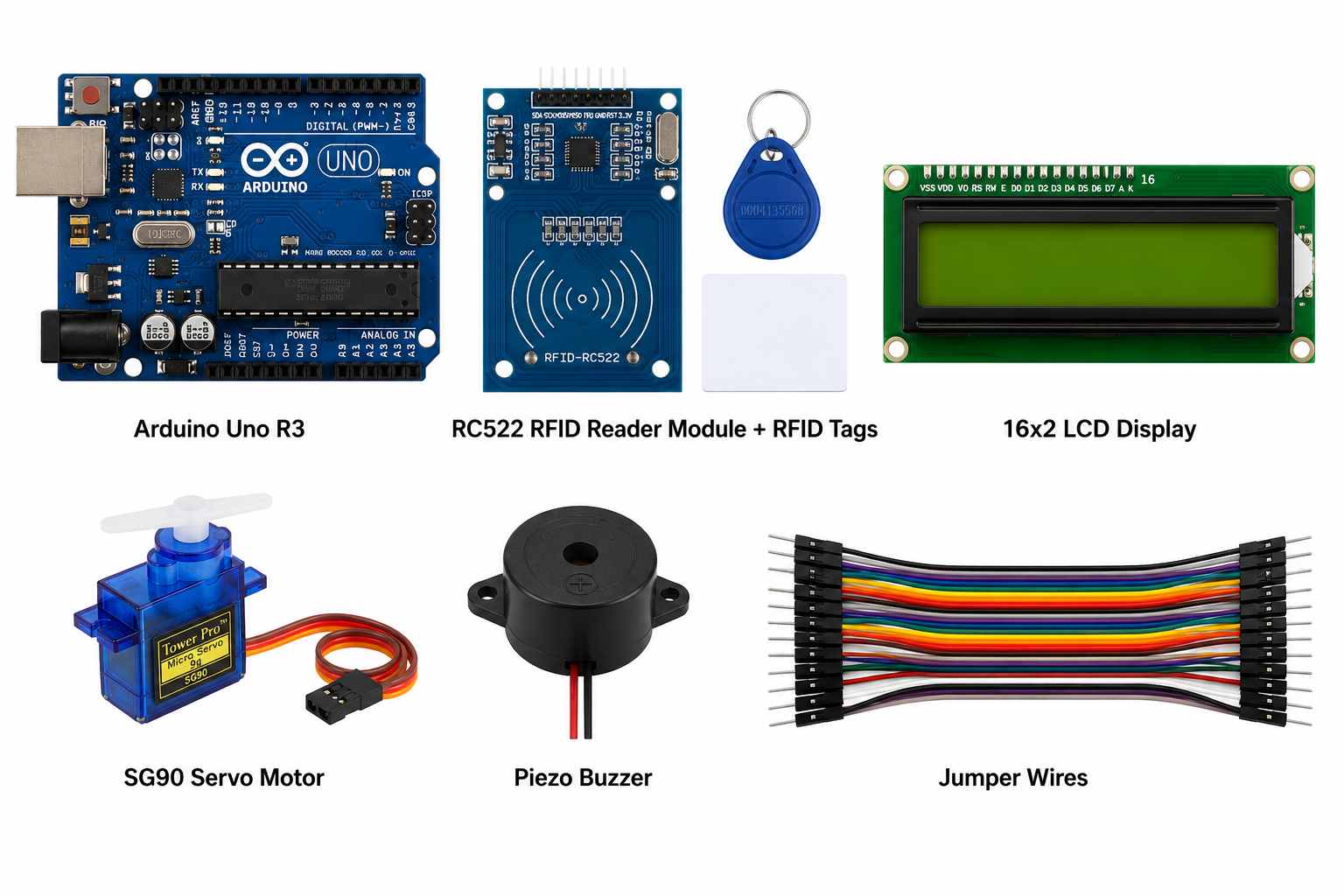
Components Included:
● Arduino Uno R3
● RC522 RFID Reader Module + RFID Tags
● 16×2 LCD Display
● SG90 Servo Motor
● Piezo Buzzer
● Jumper Wires
Key Features & Specifications
- Controller: Arduino-based control system
- Authentication: RFID card and tag scanning
- Display: LCD interface for system information
- Attendance: Automated attendance tracking
- Monitoring: Real-time attendance feedback
- User Management: Add and remove registered users
- Customization: Programmable Arduino platform
- Operation: Simple and user-friendly
- Power: Low-power operation
- Technology: RFID, Arduino, LCD, and embedded systems
- Design: Suitable for educational and prototype projects
Applications & Use Cases
The Arduino RFID Attendance System works well for schools, colleges, training centers, offices, workshops, and events. For example, teachers can use the project to demonstrate automated student attendance with RFID cards.Similarly, offices can adapt the system for basic employee check-in applications. In addition, students can explore RFID communication, Arduino programming, LCD interfacing, and embedded automation through practical experiments.Furthermore, users can expand the system with additional connectivity and data-storage features. For instance, they can integrate suitable communication modules for remote monitoring. As a result, the project provides a useful platform for learning smart attendance management, RFID authentication, and Arduino-based automation.Overall, the system combines simple hardware with programmable control. Therefore, it offers a practical solution for learning and developing RFID-based attendance applications.
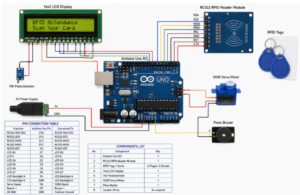
Function: The RC522 reads RFID card UIDs. Authorized cards trigger an attendance confirmation, buzzer beep, LCD message, and servo movement.
Connections
| Component | Arduino Uno Pin |
| RC522 SDA / SS | D10 |
| RC522 SCK | D13 |
| RC522 MOSI | D11 |
| RC522 MISO | D12 |
| RC522 RST | D9 |
| RC522 VCC | 3.3V |
| RC522 GND | GND |
| Servo Signal | D6 |
| Buzzer + | D7 |
| I2C LCD SDA | A4 |
| I2C LCD SCL | A5 |
Required libraries: MFRC522 and LiquidCrystal_I2C. The RC522 must be powered from 3.3V, not 5V. This code assumes a 16×2 I2C LCD at address 0x27.
#include <SPI.h>
#include <MFRC522.h>
#include <Wire.h>
#include <LiquidCrystal_I2C.h>
#include <Servo.h>
#define SS_PIN 10
#define RST_PIN 9
#define SERVO_PIN 6
#define BUZZER_PIN 7
MFRC522 rfid(SS_PIN, RST_PIN);
LiquidCrystal_I2C lcd(0x27, 16, 2);
Servo gateServo;
byte authorizedUIDs[][4] = {
{0x12, 0x34, 0x56, 0x78},
{0xAB, 0xCD, 0xEF, 0x12}
};
const int numberOfCards = 2;
void setup() {
Serial.begin(9600);
SPI.begin();
rfid.PCD_Init();
lcd.init();
lcd.backlight();
pinMode(BUZZER_PIN, OUTPUT);
gateServo.attach(SERVO_PIN);
gateServo.write(0);
lcd.print(“RFID Attendance”);
lcd.setCursor(0, 1);
lcd.print(“Scan Card…”);
}
void loop() {
if (!rfid.PICC_IsNewCardPresent()) return;
if (!rfid.PICC_ReadCardSerial()) return;
Serial.print(“Card UID: “);
for (byte i = 0; i < rfid.uid.size; i++) {
Serial.print(rfid.uid.uidByte[i], HEX);
Serial.print(” “);
}
Serial.println();
if (checkAuthorized()) {
lcd.clear();
lcd.print(“Access Granted”);
lcd.setCursor(0, 1);
lcd.print(“Attendance OK”);
tone(BUZZER_PIN, 1500);
delay(200);
noTone(BUZZER_PIN);
gateServo.write(90);
delay(3000);
gateServo.write(0);
} else {
lcd.clear();
lcd.print(“Access Denied”);
lcd.setCursor(0, 1);
lcd.print(“Unknown Card”);
tone(BUZZER_PIN, 500);
delay(1000);
noTone(BUZZER_PIN);
}
delay(1000);
lcd.clear();
lcd.print(“RFID Attendance”);
lcd.setCursor(0, 1);
lcd.print(“Scan Card…”);
rfid.PICC_HaltA();
rfid.PCD_StopCrypto1();
}
bool checkAuthorized() {
if (rfid.uid.size != 4) return false;
for (int card = 0; card < numberOfCards; card++) {
bool match = true;
for (byte i = 0; i < 4; i++) {
if (rfid.uid.uidByte[i] != authorizedUIDs[card][i]) {
match = false;
break;
}
}
if (match) return true;
}
return false;
}
To register a card, scan it and copy its UID from Serial Monitor into the authorizedUIDs array.
Only logged in customers who have purchased this product may leave a review.
Related products

Soldering Set
- ₨900.00
- Add to cart

-
Sale!
4 Wheel Smart Car Chassis Sheet
-
₨2,280.00Original price was: ₨2,280.00.₨2,200.00Current price is: ₨2,200.00. - Add to cart
-
Sale!
Reviews
There are no reviews yet.